AERONET Instrument Troubleshooting Interface - Solutions for INCOMPLETE ALMUCANTARS/HYBRIDS Flag
Description An almucantar or hybrid scan sweeps across a wide arc of the sky and must complete its full angular range to be scientifically valid. If the robot stops mid-scan - due to cable binding, a power interruption, or a robot fault - the scan is recorded as incomplete and cannot be used for aerosol inversion retrievals.
Condition(s) Flag if more than 20% of almucantars are incomplete (possible MAX bytes problem)
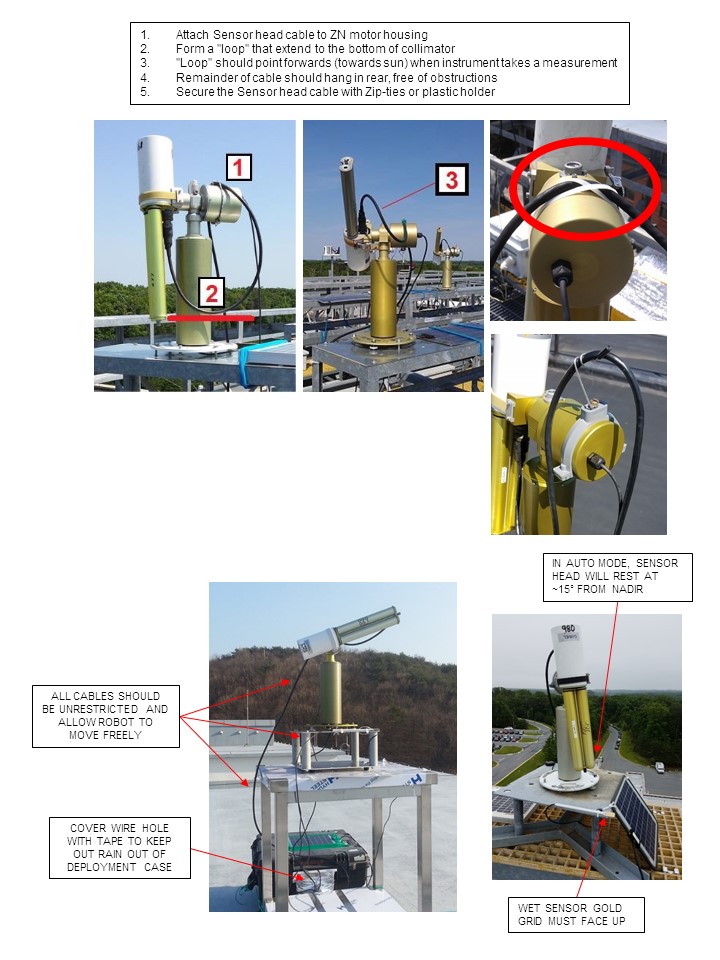
How To Check/Test 1. Verify the cables are not tangled or restricting the sensor head or robot from moving freely when doing the almucantar and hybrid scans (see Check setup)
Solution Level 1 (< 5 minutes) 1. Watch the instrument take the almucantar or hybrid scans (full sky scans) and verify no cables are restricting the sensor head or robot from moving freely and adjust the cables as necessary.
Solution Level 2 (more involved) 1. Turn auto OFF and manually rotate the sensor head 180 degrees in both directions to check for cable binding. Turn auto back to ON when cables are fixed
Solution Level 3 (last resort) 1. Contact AERONET technical support team for further troubleshooting tips or robot replacement.